
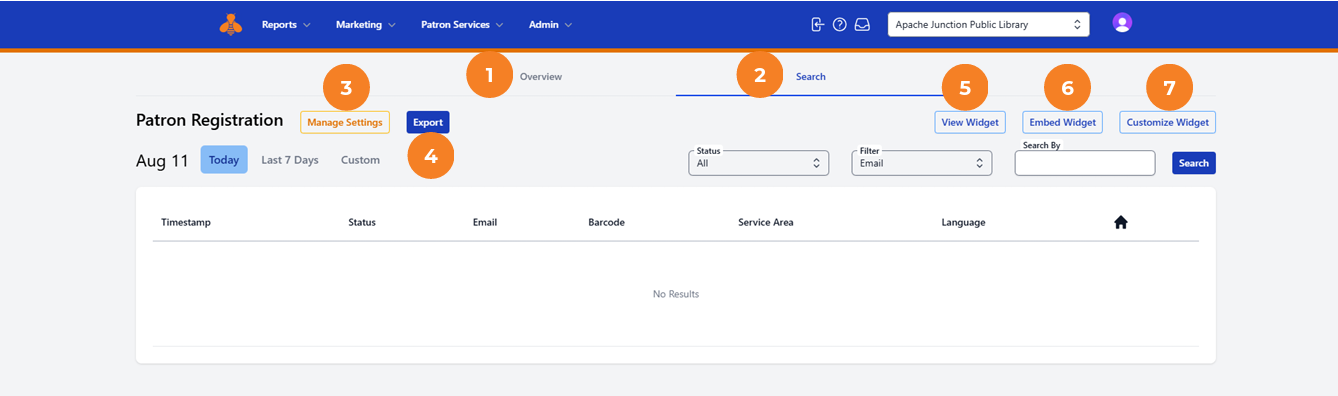
1. Overview
The Patron Registration Overview provides a clear, easy-to-read summary of registration activity.
2. Search
The Search page is the default landing page. From here, you can view settings, review and customize the widget, view registration activity by date range, and search for specific registrations.
3. Manage Settings
Use Manage Settings to review your geographies and update Terms & Conditions and communication agreements.
4. Export
Use Export to download a list of registrations in .csv format.
5. View Widget
Use View Widget to preview your widget. This link can also be added to your website.
6. Embed Widget
Use Embed Widget to access instructions for adding the widget to your website.
7. Customize Widget
Use Customize Widget to adjust colors, fonts, and other display options. The customization workflow confirms that settings meet WCAG compliance requirements, allows you to preview each step of the registration experience, and shows how statuses will appear to registrants.