
When implementing SMS notifications through MessageBee, you may have questions about the automatic HELP, STOP, and START responses. These responses are an important part of industry-standard SMS messaging and help ensure compliance with U.S. wireless carrier requirements.
HELP Responses:
Although the HELP feature is not explicitly required by the Telephone Consumer Protection Act (TCPA), it is considered an industry best practice and is expected by U.S. wireless carriers and The Campaign Registry (TCR) as part of 10DLC campaign compliance. For this reason, HELP responses are enabled for all MessageBee SMS campaigns.
The good news is that your staff are not required to monitor or respond to incoming text messages.
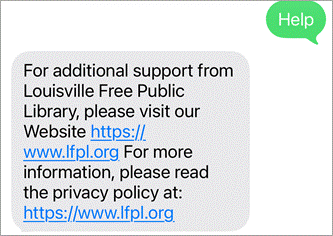
When a patron replies HELP, MessageBee automatically sends a response that includes your library's contact information, such as:
- Phone number
- Email address
- Website
- Instructions to reply STOP to unsubscribe
We can customize this automated response to include the contact information you would like patrons to use.
Sample HELP response:
STOP (Opt-out) Responses:
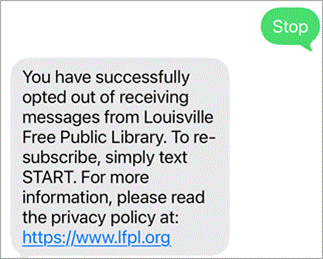
When a patron replies STOP, MessageBee automatically suppresses future SMS notifications to that phone number.
It's important to understand that:
- The opt-out is maintained within MessageBee.
- The patron will no longer receive SMS notifications through MessageBee unless they opt back in.
Supporting STOP functionality is a core requirement of current 10DLC messaging standards.
Sample STOP response:
START (Opt-in) responses:
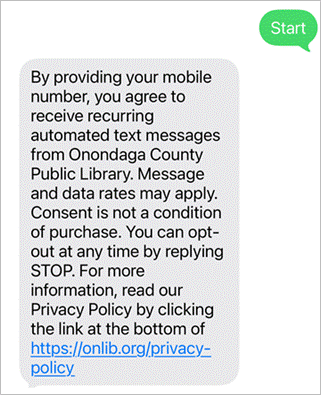
If a patron wishes to resume receiving SMS notifications, they can simply reply START. MessageBee will automatically restore SMS messaging for that phone number and send a confirmation message.
Sample START response:
Automatic Replies to Incoming Messages
If your library does not monitor incoming text messages, MessageBee can also be configured with an automatic reply for patrons who send messages to your SMS number.
This auto-reply can inform patrons that the number is not monitored and direct them to the appropriate contact method, such as a phone number, email address, or website.
Sample Auto-Reply response:
Thank you for contacting [Library Name]. This text number is not monitored and we are unable to respond to incoming messages. For assistance, please call (555) 555-5555, email library@library.org, or visit www.library.org.
The wording of this message is fully customizable, and our team will configure it based on your preferred language and contact information.